You can usually press the Tab key on your keyboard to cycle between fields in a form. Test this out manually before creating the Snippet. Once you have the sequence down, you can insert tabs in the Snippet editor between each piece of content you’d like to fill in. Be sure to not add extra spaces or return characters.
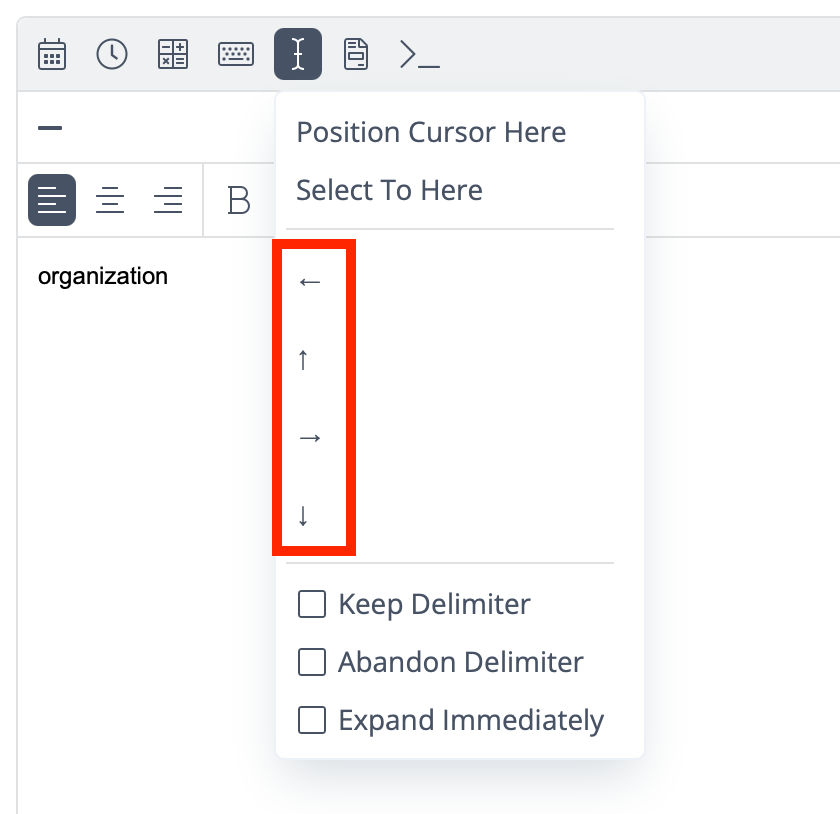
The lesser-known option is arrow macros, which you can find under the cursor icon. These simulate pressing the arrow keys on your keyboard and are especially helpful in navigating dropdown lists in forms.
It would be REALLY nice if you had more cursor positioning controls than just the arrows. I was doing a task that I needed to move the cursor from the current position to the end-of-line. I had to download another program to get that functionality.
In quicken i double click the comment field and need to up-arrow to get to the beginning if there is already content, then i have a code for reconciliating, then space, space, then contents of clipboard where i textsniped the balance that matches the statement balance, then two spaces for clarity, then i want to shift tab twice to get back to the tags field where i put in reconciled code R+ last two digits of this account, then return, return to finish transaction, then manually Option+click CLR field to tuen circle green.
And here’s a video of the snippet in action, with the Shift+Tab moving back to the cell with Go in it. I have popped a screen recording online of it in action.
thanks for jumping on this. Last night claude and i went thru applescript options and kpt having problems with timing for my specific set of keystrokes
I’ll have to try out your clever solution…
But i finally figured out a silution without needing back-tabs…
Just found the work-around late last night. Hadn’t hsad a chance to get back to this community until i saw your help checking emails first thing today.
But finding a way to shift+tab is still a usable keystroke. I’m interested to try out your suggestion.
i found two solutions.
1. Double click the transaction to enter edit mode, then click EDIT DETAILS that gives the memonoted field where i can click then type the abbreviatin to start the proceaa and the TAGS field is one forward TAB so no shift+tabs are needed.
Instead of two shift+tabs, five forward TABs gets me into the same destination
This is your space to ask questions, find support, and share ideas with fellow TextExpander users and our product team. As a first step, take a moment to introduce yourself to the community.